
Your team votes on its O&O list to decide what to work on in the meeting. Bloom Growth offers two voting styles, and you can switch between them at any time.
The two voting styles
- Star voting — Everyone gets 5 stars to add to the O&Os they deem most important to solve this meeting.
- By priority — The leader or group can decide which O&Os hold the highest priority.
Which style your meetings start on
The voting style belongs to the meeting, not to your whole organization, so two meetings in the same organization can use different styles.
A meeting created in an organization that was set up on or after September 9, 2026 starts on the style that matches how the organization was set up: Star voting for an organization on the Bloom Growth Operating System, By priority for the rest. Before that change every meeting started on By priority.
This is only a starting point. Organizations set up earlier keep the style their meetings already use, and any meeting can be switched whenever you like.
Changing the voting style
- Open the meeting and go to the O&O list.
- Click the ⋮ (More options) button in the top-right corner of the O&O list.
- Scroll down to the Voting style heading.
- Click Star voting or By priority. A check mark appears beside the style the meeting is using.
Note: while a meeting is running, only the meeting leader can change the voting style — anyone else sees the tooltip "Only the leader can change voting style". Outside a running meeting, anyone who can edit the meeting's O&Os can change it.
Star voting options
When Star voting is selected, two options appear under it:
- 5 stars per user — everyone in the meeting gets five stars to spend across the list.
- Unlimited leader votes — the meeting leader gets a star control that is not capped at five.
Picking O&Os By priority: the numbers stay put
When your meeting uses By priority, each O&O keeps the same number for the whole meeting. Picking, working or solving one no longer renumbers the others, so anyone can call out "number 4" and everyone lands on the same O&O.
- In the meeting, open the menu at the top right of the O&O list and, under Voting style, select By priority.
- Click the priority icon next to an O&O to pick it. Your first two picks light up where they are.
- Make your third pick. All three move to the top of the list in the order you picked them, keeping the numbers they already had.
- To start over, click Clear selection at the top of the list. It drops all three picks at once.
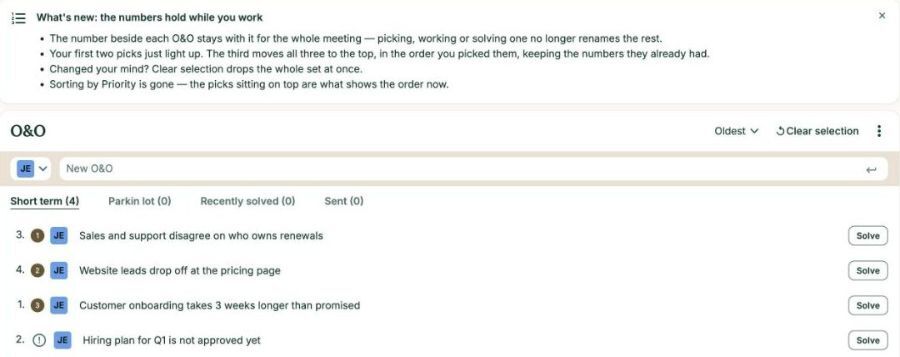
The first time your team sees this, a short notice titled What's new: the numbers hold while you work explains the change. Sorting by Priority is no longer offered, because the picks sitting on top already show the order.
How many stars you get in Star voting
With Star voting, the number of stars each person gets now depends on how long the O&O list is: 5 stars on a list of up to 12 O&Os, and more on longer lists, up to 20. You can still put up to 5 stars on any one O&O.
- In the meeting, open the menu at the top right of the O&O list and, under Voting style, select Star voting.
- Check your budget in the notice above the list: You have [number] stars to spend on this list.
- Add stars to the O&Os that matter most. You don't have to use them all.
- Click Submit votes once you have given at least one star.
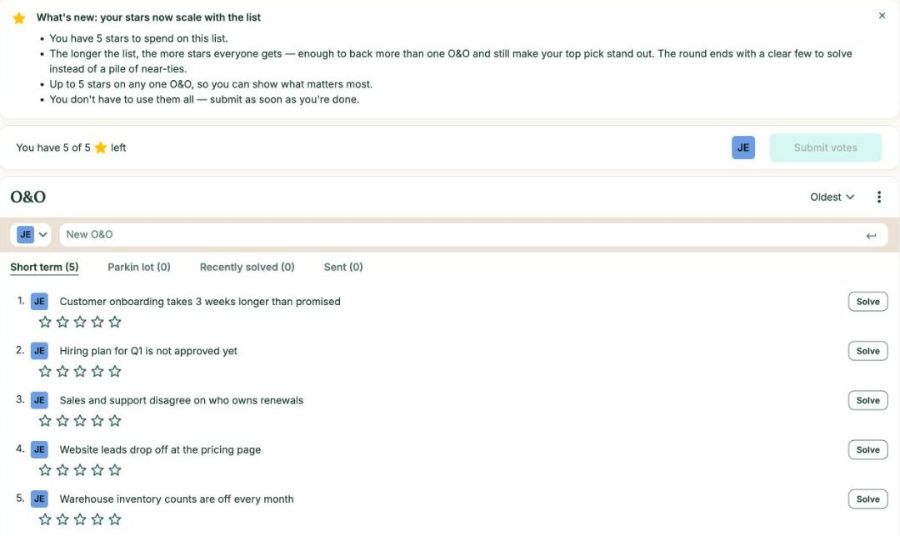
note: The voting menu option still reads 5 stars per user. Your actual budget is the number shown in the notice above the list.